
BoxTrapper requires all email senders not on your Whitelist to respond to verification emails. It protects you from spam.
If you want to get rid of unwanted emails, enable Boxtrapper either on all emails or just selected emails and configure it.
1. Log in to your cPanel Account,
2. In the Email section, click on BoxTrapper.

3. On the BoxTrapper's page, you see a list of your emails under the Account heading and the status of BoxTrapper under the Status heading. Choose Manage.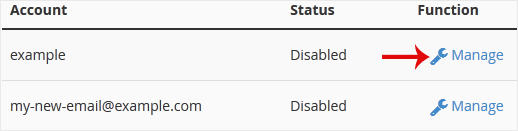
4. On the BoxTrapper's Manage page, if the status is Disabled, Choose Enable.
Wissensdatenbank
Falls Sie in unserer Wissensdatenbank keine Lösung für Ihr Problem finden, können Sie ein Ticket einreichen, indem Sie unten die entsprechende Abteilung auswählen.
How to Enable BoxTrapper in cPanel
0
War diese Antwort hilfreich?
Back
Updated knowledgebase article view