
You can easily change the password if you have access to your WordPress account.
1. Log in to the WordPress dashboard.
2. From the Dashboard menu, go to Users and click on Profile.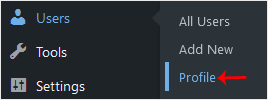
3. Scroll down to Account Management and click on Set New Password.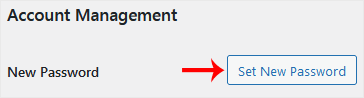
4. Copy the password to a safe place and click on Update Profile to change your password.
Wissensdatenbank
Falls Sie in unserer Wissensdatenbank keine Lösung für Ihr Problem finden, können Sie ein Ticket einreichen, indem Sie unten die entsprechende Abteilung auswählen.
How to Change the Password of a WordPress Account
0
War diese Antwort hilfreich?
Back
Updated knowledgebase article view